
[Twiz O'meter/BigToM/ToM+] Update to firmware 2.3
- Delvecchio
-

- Autor
- Top Boarder
-

- Fabio java
- Beiträge: 911
- Dank erhalten: 1515
Enjoy it!
What is new in firmware 2.30
=================================
- added the possibility to update the display firmware OTA, like it's already possible with the black-box firmware.
The updating procedure has been heavy tested, also with wrong and intentionally corrupted files, and showed to be quiet robust and stable
The OTA update of the display is performed "onfly", by chunks, so it could take a few minutes to be completed, especially in case of slow wi-fi connection
- in the info condensed battery page the min and max voltage cells are now pointed with a plain circle, respectively blue and red
- added a new item for cell voltage difference, between the lowest and highest cells voltage. This item will be labeled as "C-D" in the mqtt payload
- the new "cell voltage difference" item is also available for triggering alarms, so you can set an alarm (mqtt, popup windows etc.) when the difference exceeds the value you set
Bug fixed:
=================================
- fixed a bug in DF & error description which caused the last (seven) row in the trip and alarm log to be hidden, only in ToM display
- deleting error from the webUI was no more working. Now it's fixed.
Known bugs:
=================================
- awaiting for your reports!

Special thanks goes to:
================================
- Snorre, for the decisive contribution in the implementation of the display OTA update.
We really engaged a challenge for the the fastest updating time, this is why you'll see the elapsed time for finishing the update.
He won with 1 minute and 11 seconds. Will someone do better? Screenshot proof required!
- Akku61 for the detailed report of the "seven row bug", which helped me a lot for finding the cause
Updating procedure:
=================================
To install the new fw you must update both the Blackbox and the screen display as explained in detail in ToM manual except for these further instructions:
- coming from 1.4 fw (and later), the Bbackbox can be updated also via OTA, without flashing
- coming from previuous versions (1.3 or 1.2) you have to update before to 1.4 (or 1.45) fw version, following the specific instructions reported in 1.4 / 1.45 topic, and only then to 1.6 fw.
- since the firmware display is now updatable OTA, I suggest to update first the blackbox and only then the display using the new OTA update, so you can test this new feature
Please remember that, while the firmware file for the black-box is the same for ToM, BigToM and ToM+, the display LCD firmware files are different, so choose inside the .zip archive the firmware file designed for your display device.
That's all... for now!
Some pictures....
OTA update also for the display firmware:
Best updating time (© Snorre):
Min-Max cells voltage:
New "Cells voltage difference" item:
Akku61: changed the zip-file to the fixed version 'Fw23_fix.zip'
Bitte Anmelden oder Registrieren um der Konversation beizutreten.
- Ulli-et-Tom
-
- Platinum Boarder
-

- Beiträge: 2839
- Dank erhalten: 2251
Chapeau
LG Tom
Twizylino 08-2012 I ToM I OVMS V3 I V:145/70R13 I H:145/80R13 I Alu I TfL I Zusatzlager I 10,5kWh Akku
Twizy(Hummel) Cargo 08-2015 I ToM I OVMS V3 I V:145/70R13 I H:145/80R13 I Alu I TfLI Zusatzlager I 10,5kWh Akku
shorturl.at/Ucb60
tcb-info[at]web.de
Threema: MJRBDTEE
Bitte Anmelden oder Registrieren um der Konversation beizutreten.
- Ulli-et-Tom
-
- Platinum Boarder
-
- Beiträge: 2839
- Dank erhalten: 2251
TwizyHummel
After Update:
...after the update. It's gone again after restarting...
The update worked perfectly. Thank you so much, Fabio!
LG Tom
Twizylino 08-2012 I ToM I OVMS V3 I V:145/70R13 I H:145/80R13 I Alu I TfL I Zusatzlager I 10,5kWh Akku
Twizy(Hummel) Cargo 08-2015 I ToM I OVMS V3 I V:145/70R13 I H:145/80R13 I Alu I TfLI Zusatzlager I 10,5kWh Akku
shorturl.at/Ucb60
tcb-info[at]web.de
Threema: MJRBDTEE
Bitte Anmelden oder Registrieren um der Konversation beizutreten.
- Delvecchio
-
- Autor
- Top Boarder
-
- Fabio java
- Beiträge: 911
- Dank erhalten: 1515
1) Snorre 111 sec
2) Ulli-et-Tom (with TwizyHummel) 167 sec
3) Fabio 192 sec
4) Ulli-et-Tom (with Twizylino) 193 sec
5) ...
6) ...
7) ...
8) ...
9) ...
10)...
I know about the "five lights". It's enough you change the page and go back to restore the correct state of the lights.
Bitte Anmelden oder Registrieren um der Konversation beizutreten.
- Delvecchio
-
- Autor
- Top Boarder
-
- Fabio java
- Beiträge: 911
- Dank erhalten: 1515
So, please, everyone (not only normal ToM) must use the attached archive for the update, not the one of the first post.
Dieser Beitrag enthält einen Anhang.
Bitte anmelden (oder registrieren) um ihn zu sehen.
Bitte Anmelden oder Registrieren um der Konversation beizutreten.
- Sherlock
-

- Senior Boarder
-

- Beiträge: 199
- Dank erhalten: 203
Es wurde schon einige Male gesagt, aber auch ich möchte Fabio öffentlich für seinen hervorragenden Kundendienst danken. Dank ihm konnte ich das Update des LCD-Bildschirms meines ToM durchführen, was gar nicht so einfach war, wie es zunächst schien. Das Problem lag nicht am ToM, sondern an der Qualität meines WLAN-Netzwerks. Sobald das Problem erkannt war, fand Fabio sehr schnell die richtige Lösung. Ehrlich gesagt, dieser Mann hätte es verdient, in einem Twizy aus massivem Gold herumzufahren! Es macht wirklich Spaß, sich in diesem Forum mit kompetenten und sympathischen Enthusiasten auszutauschen.
Hello dear Twizy friends,
It has already been said several times, but I would also like to publicly thank Fabio for his excellent customer service. Thanks to him, I was able to update the LCD screen on my ToM, which was not as easy as it seemed at first. The problem was not with the ToM, but with the quality of my Wi-Fi network. Once the problem was identified, Fabio quickly found the right solution. Honestly, this man deserves to drive around in a Twizy made of solid gold! It's really fun to exchange ideas with knowledgeable and friendly enthusiasts on this forum.
Bitte Anmelden oder Registrieren um der Konversation beizutreten.
- RolandE
-
- Senior Boarder
-
- Beiträge: 170
- Dank erhalten: 52
Ps. Hoffe richtige Rubrik

Liebe Grüße Roland
Bitte Anmelden oder Registrieren um der Konversation beizutreten.
2012 Twizy Carbon CALB Zellen und 5 KWh T-Supercharger
2016 Cargo Pazifik Blau CALB Zellen und 5 KWh T-Supercharger
www.T-Parts.eu
Diese E-Mail-Adresse ist vor Spambots geschützt! Zur Anzeige muss JavaScript eingeschaltet sein!
Bitte Anmelden oder Registrieren um der Konversation beizutreten.
- Ulli-et-Tom
-
- Platinum Boarder
-
- Beiträge: 2839
- Dank erhalten: 2251
HollandHannes schrieb: 79 Sekunden!
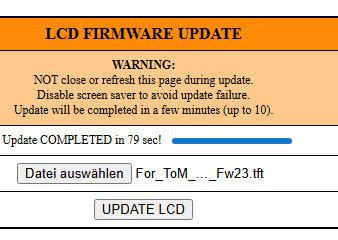
Komm, sei ehrlich !
...du hast ein LAN- oder USB-Kabel aus dem Fenster geworfen

LG Tom
Twizylino 08-2012 I ToM I OVMS V3 I V:145/70R13 I H:145/80R13 I Alu I TfL I Zusatzlager I 10,5kWh Akku
Twizy(Hummel) Cargo 08-2015 I ToM I OVMS V3 I V:145/70R13 I H:145/80R13 I Alu I TfLI Zusatzlager I 10,5kWh Akku
shorturl.at/Ucb60
tcb-info[at]web.de
Threema: MJRBDTEE
Bitte Anmelden oder Registrieren um der Konversation beizutreten.
- Delvecchio
-
- Autor
- Top Boarder
-
- Fabio java
- Beiträge: 911
- Dank erhalten: 1515
HollandHannes schrieb: 79 Sekunden!

So, the top ten of the "OTA update challenge":
1) Holland Hannes 79 sec
2) Snorre 111 sec
3) Ulli-et-Tom (with TwizyHummel) 167 sec
4) Fabio 192 sec
5) Ulli-et-Tom (with Twizylino) 193 sec
6) ...
7) ...
8) ...
9) ...
10)...
Bitte Anmelden oder Registrieren um der Konversation beizutreten.
2012 Twizy Carbon CALB Zellen und 5 KWh T-Supercharger
2016 Cargo Pazifik Blau CALB Zellen und 5 KWh T-Supercharger
www.T-Parts.eu
Diese E-Mail-Adresse ist vor Spambots geschützt! Zur Anzeige muss JavaScript eingeschaltet sein!
Bitte Anmelden oder Registrieren um der Konversation beizutreten.
- Delvecchio
-
- Autor
- Top Boarder
-
- Fabio java
- Beiträge: 911
- Dank erhalten: 1515
1) Holland Hannes 79 sec
2) Holland Hannes (with Cargo) 87 sec
3) Snorre 111 sec
4) Ulli-et-Tom (with TwizyHummel) 167 sec
5) Fabio 192 sec
6) Ulli-et-Tom (with Twizylino) 193 sec
7) ...
8) ...
9) ...
10)...
Bitte Anmelden oder Registrieren um der Konversation beizutreten.
- Akku61
-

- Moderator
-

- Moderator sein heißt andere verstehen lernen.
- Beiträge: 3995
- Dank erhalten: 3398

Viele Grüße, Andreas
Twizy color 08-2012 | Twizy Sport 04-2015 | Panoramadach | ToM Twiz ‘o meter | Heckfolien | Schmutzfänger | 10kWh Voltraa-Akku | Rozhkov BMS
Tesla Model 3 - long-range, Heckantrieb | PV-Strom | green-planet-energy
Bitte Anmelden oder Registrieren um der Konversation beizutreten.
- Delvecchio
-
- Autor
- Top Boarder
-
- Fabio java
- Beiträge: 911
- Dank erhalten: 1515
1) Holland Hannes 79 sec
2) Holland Hannes (with Cargo) 87 sec
3) Akku61 93 sec
4) Snorre 111 sec
5) Ulli-et-Tom (with TwizyHummel) 167 sec
6) Fabio 192 sec
7) Ulli-et-Tom (with Twizylino) 193 sec
8) ...
9) ...
10)...
Now I must think about the first place prize.

Bitte Anmelden oder Registrieren um der Konversation beizutreten.
- PriusTwizy
-
- Expert Boarder
-

- 2020 Twizy 80
- Beiträge: 226
- Dank erhalten: 322
A feature that would prevent this situation is a switch in the setting along the lines of "Only connect to the wifi SSIDs that are set in the list".
It's not critical, and I don't know if more people have this problem, but it would be a nice to have for me. Thank you.
2020 Twizy 80 with Korea windows. I have a Twiz'O'meter which is connected to my Home Assistant. I have a type 2 adapter and a CEE adapter so I can charge everywhere. I can read and understand German pretty well, but I can't write it
So please feel free to reply in German to my English posts.
Bitte Anmelden oder Registrieren um der Konversation beizutreten.