
[Twiz O'Meter / BigToM] Update to firmware 2.1
- Delvecchio
-

- Autor
- Top Boarder
-

- Fabio java
- Beiträge: 934
- Dank erhalten: 1535
27 Aug 2025 14:37 - 27 Aug 2025 14:55 #271589
von Delvecchio
[Twiz O'Meter / BigToM] Update to firmware 2.1
New firmware update!
I'm back with a "ready to flash" firmware update for ToM & BigToM.
I think the new feature is a very useful addition, because will enable the device to read and delete the Twizy system errors, without struggling yourself for finding a compatible OBD dongle to be used with the well knwon diagnostic apps.
This time I'll start from the end, from thanks giving, because without Snorre, who motivated me from the beginning to look for a way to read the errors, probably this new feature would not have been implemented.
So, special thanks goes to:
=================================
- Snorre who gave me precious help/hints in beta testing, also for forcing the generation of Twizy errors for developping purposes.
What is new in firmware 2.10
=================================
- the device is now able to read and delete the DTC errors of the Twizy!
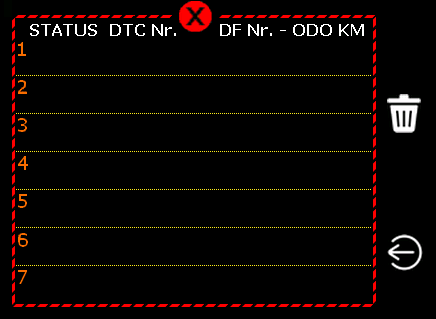
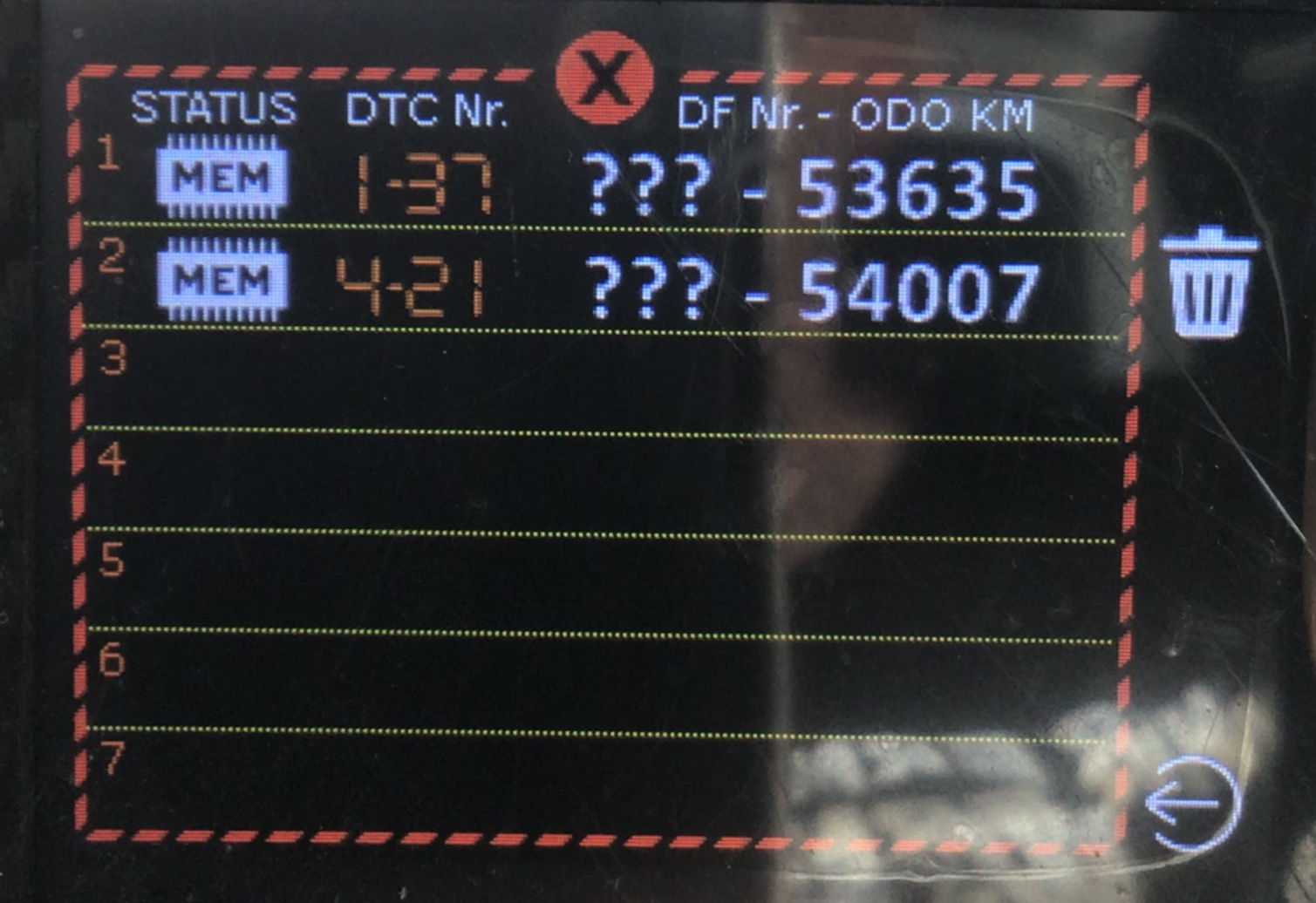
An error log page has been added to the display. To enter in the error log mode, just long tap on the Alarm icon and, when the Trip log icon will appear, long tap again on it.
The new icon error will appear and you can tap on it for accessing to the error log page.
Remember that no confirmation will be requested for deleting the error list, so errors will be cleared after pressing the trash icon.
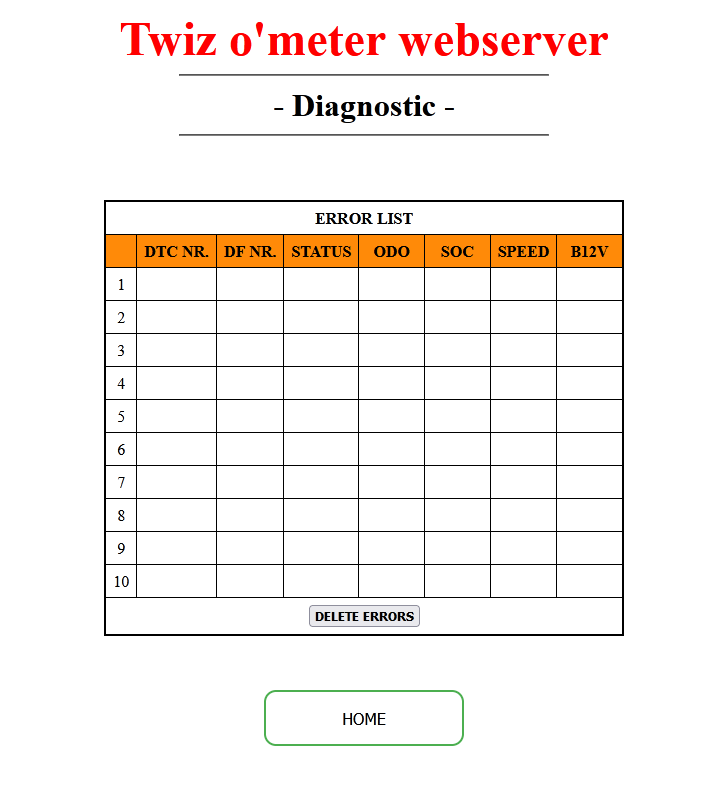
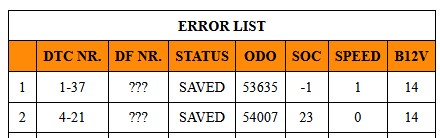
Further information (DTC, STATUS, ODO, SOC, speed, B12v) about the error listed is available in the new Diagnostic page of the webUI, where you can also delete the errors.
Conversion to DF error numbering is planned but not yet made available.
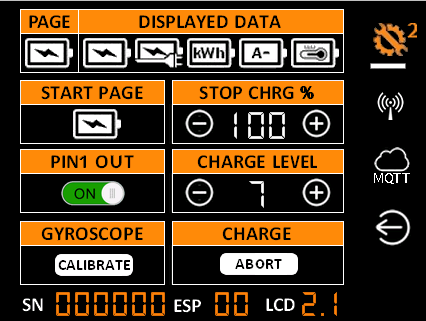
- added a new command in the second setup page of the display, intended to manually activate the expansion pin if set as output.
Only one output pin can be controlled, so if you have both pin configured as output, PIN1 will be predominant.
Please pay attention that:
() the on/off slider switch will show the logical state of the pin, not the electric-digital one.
So, if you have set the output as active low, the switch will show the OFF state when the pin is electrically high and viceversa
() the on/off slider switch will follows the rules of the output type you selected: i.e. if, for example, you set the output as "Aux charger" the switch will have effect only during charging
() enabling/disabling manually the output pin will desyncronize it with the Alarm state.
Since the last Alarm state is saved, the alarm won't re-do the same action while the conditions are still satisfied.
So, for example, if you set to ON the pin after the alarm already set it to OFF, the alarm won't switch it OFF again (in the same ToM session), because it thinks the pin has been already set to OFF and that there is no reason to switch it OFF another time.
Bug fixed:
=================================
- in the BigToM speedometer page, the second digit of the speed wasn't displayed over 100 km/h (yes, there is someone among us who wants to break the sound barrier with his Twizy equipped with a BigTom!). Now it is properly displayed.
- some minor bugs and cosmetic graphical issues have been fixed, but I've lost memory of them.
Known bugs:
=================================
- none at the moment , but I'm waiting for your reports!
Updating procedure:
=================================
To install the new fw you have to update both the Blackbox and the display as explained in detail in ToM manual except for these further instructions:
- coming from 1.4 fw (and later), the Blackbox can be updated also via OTA, without flashing
- coming from previuous versions (1.3 or 1.2) you have to update before to 1.4 (or 1.45) fw version, following the specific instructions reported in 1.4 / 1.45 topic, and only then to 1.6 fw.
Please remember that, while the firmware file for the black-box is the same for ToM and BigToM, the display LCD firmware files are different, so choose inside the .zip archive the firmware file designed for your display device.
And please, once again, you have to strictly follow all the mentioned steps!!!
That's all... for now!
A few screen shots of the new features...
I'm back with a "ready to flash" firmware update for ToM & BigToM.
I think the new feature is a very useful addition, because will enable the device to read and delete the Twizy system errors, without struggling yourself for finding a compatible OBD dongle to be used with the well knwon diagnostic apps.
This time I'll start from the end, from thanks giving, because without Snorre, who motivated me from the beginning to look for a way to read the errors, probably this new feature would not have been implemented.
So, special thanks goes to:
=================================
- Snorre who gave me precious help/hints in beta testing, also for forcing the generation of Twizy errors for developping purposes.
What is new in firmware 2.10
=================================
- the device is now able to read and delete the DTC errors of the Twizy!
An error log page has been added to the display. To enter in the error log mode, just long tap on the Alarm icon and, when the Trip log icon will appear, long tap again on it.
The new icon error will appear and you can tap on it for accessing to the error log page.
Remember that no confirmation will be requested for deleting the error list, so errors will be cleared after pressing the trash icon.
Further information (DTC, STATUS, ODO, SOC, speed, B12v) about the error listed is available in the new Diagnostic page of the webUI, where you can also delete the errors.
Conversion to DF error numbering is planned but not yet made available.
- added a new command in the second setup page of the display, intended to manually activate the expansion pin if set as output.
Only one output pin can be controlled, so if you have both pin configured as output, PIN1 will be predominant.
Please pay attention that:
() the on/off slider switch will show the logical state of the pin, not the electric-digital one.
So, if you have set the output as active low, the switch will show the OFF state when the pin is electrically high and viceversa
() the on/off slider switch will follows the rules of the output type you selected: i.e. if, for example, you set the output as "Aux charger" the switch will have effect only during charging
() enabling/disabling manually the output pin will desyncronize it with the Alarm state.
Since the last Alarm state is saved, the alarm won't re-do the same action while the conditions are still satisfied.
So, for example, if you set to ON the pin after the alarm already set it to OFF, the alarm won't switch it OFF again (in the same ToM session), because it thinks the pin has been already set to OFF and that there is no reason to switch it OFF another time.
Bug fixed:
=================================
- in the BigToM speedometer page, the second digit of the speed wasn't displayed over 100 km/h (yes, there is someone among us who wants to break the sound barrier with his Twizy equipped with a BigTom!). Now it is properly displayed.
- some minor bugs and cosmetic graphical issues have been fixed, but I've lost memory of them.
Known bugs:
=================================
- none at the moment
, but I'm waiting for your reports! Updating procedure:
=================================
To install the new fw you have to update both the Blackbox and the display as explained in detail in ToM manual except for these further instructions:
- coming from 1.4 fw (and later), the Blackbox can be updated also via OTA, without flashing
- coming from previuous versions (1.3 or 1.2) you have to update before to 1.4 (or 1.45) fw version, following the specific instructions reported in 1.4 / 1.45 topic, and only then to 1.6 fw.
Please remember that, while the firmware file for the black-box is the same for ToM and BigToM, the display LCD firmware files are different, so choose inside the .zip archive the firmware file designed for your display device.
And please, once again, you have to strictly follow all the mentioned steps!!!
That's all... for now!
A few screen shots of the new features...
Letzte Änderung: 27 Aug 2025 14:55 von Delvecchio.
Folgende Benutzer bedankten sich: Akku61, Snorre, Drakoon1964, Ulli-et-Tom, HollandHannes, FRZ77, Sherlock, SaschaB
Dieses Thema wurde gesperrt.
- Ulli-et-Tom
-
- Platinum Boarder
-

- Beiträge: 2850
- Dank erhalten: 2261
29 Aug 2025 13:20 - 29 Aug 2025 13:21 #271674
von Ulli-et-Tom
Twizylino 08-2012 I ToM I OVMS V3 I V:145/70R13 I H:145/80R13 I Alu I TfL I Zusatzlager I 10,5kWh Akku
Twizy(Hummel) Cargo 08-2015 I ToM I OVMS V3 I V:145/70R13 I H:145/80R13 I Alu I TfLI Zusatzlager I 10,5kWh Akku
shorturl.at/Ucb60
tcb-info[at]web.de
Threema: MJRBDTEE
[Twiz O'Meter / BigToM] Update to firmware 2.1
Hi Fabio,
...I finally got around to testing it...
The manual control of PIN1 (in conjunction with AUX-Charger) works exactly as it should.
When charging starts, PIN1 is controlled according to the set alarm trigger and can be controlled manually (on the second settings page).
Thank you very much for implementing this – it's about time for a truckload of chocolate to Modena.... 
Hallo Fabio,
...ich habe es endlich geschafft, es zu testen...
Die manuelle Steuerung von PIN1 (in Verbindung mit AUX-Charger) funktioniert genau wie vorgesehen.
Wenn der Ladevorgang beginnt, wird PIN1 entsprechend dem eingestellten Alarmtrigger gesteuert und kann manuell gesteuert werden (auf der zweiten Einstellungsseite).
Vielen Dank für die Umsetzung – es ist an der Zeit für eine LKW-Ladung Schokolade nach Modena....
LG Tom
...I finally got around to testing it...
The manual control of PIN1 (in conjunction with AUX-Charger) works exactly as it should.
When charging starts, PIN1 is controlled according to the set alarm trigger and can be controlled manually (on the second settings page).
Thank you very much for implementing this – it's about time for a truckload of chocolate to Modena....
Hallo Fabio,
...ich habe es endlich geschafft, es zu testen...
Die manuelle Steuerung von PIN1 (in Verbindung mit AUX-Charger) funktioniert genau wie vorgesehen.
Wenn der Ladevorgang beginnt, wird PIN1 entsprechend dem eingestellten Alarmtrigger gesteuert und kann manuell gesteuert werden (auf der zweiten Einstellungsseite).
Vielen Dank für die Umsetzung – es ist an der Zeit für eine LKW-Ladung Schokolade nach Modena....
LG Tom
Twizylino 08-2012 I ToM I OVMS V3 I V:145/70R13 I H:145/80R13 I Alu I TfL I Zusatzlager I 10,5kWh Akku
Twizy(Hummel) Cargo 08-2015 I ToM I OVMS V3 I V:145/70R13 I H:145/80R13 I Alu I TfLI Zusatzlager I 10,5kWh Akku
shorturl.at/Ucb60
tcb-info[at]web.de
Threema: MJRBDTEE
Letzte Änderung: 29 Aug 2025 13:21 von Ulli-et-Tom.
Folgende Benutzer bedankten sich: sunneraindler, Delvecchio
Dieses Thema wurde gesperrt.
- Delvecchio
-
- Autor
- Top Boarder
-
- Fabio java
- Beiträge: 934
- Dank erhalten: 1535
29 Aug 2025 14:31 #271675
von Delvecchio

[Twiz O'Meter / BigToM] Update to firmware 2.1
Ulli-et-Tom schrieb: it's about time for a truckload of chocolate to Modena....
Dieses Thema wurde gesperrt.
- Akku61
-

- Moderator
-

- Moderator sein heißt andere verstehen lernen.
- Beiträge: 4008
- Dank erhalten: 3413
12 Sep 2025 17:34 - 13 Sep 2025 10:10 #272131
von Akku61
Viele Grüße, Andreas
Twizy color 08-2012 | Twizy Sport 04-2015 | Panoramadach | ToM Twiz ‘o meter | Heckfolien | Schmutzfänger | 10kWh Voltraa-Akku | Rozhkov BMS
Tesla Model 3 - long-range, Heckantrieb | PV-Strom | green-planet-energy
[Twiz O'Meter / BigToM] Update to firmware 2.1
Today I finally updated my ToM to FW 2.1
The new diagnostiv screen is GREAT - many thanks for this
My Twizy have two errors stored, but as I don't have any problems I am not afraid
With the translation List from ThM (thank you) I knew
DTC 1.37 = DF512, DTC4.21 = DF542
But apparently I'm too stupid to find the complete list explaining what the DF codes mean.
Edit: I‘m really stupid! I found the list in the same thread as listed above
www.twizy-forum.de/ovms/86362-liste-df-codes-dtc?start=0#179755
Searching the numbers in the forum I found
- Update of the display works fine with the first try!

- Update of the black box OTA stuck severeal times at 50% or 63%, don't know why.
The new diagnostiv screen is GREAT - many thanks for this
My Twizy have two errors stored, but as I don't have any problems I am not afraid
With the translation List from ThM (thank you) I knew
DTC 1.37 = DF512, DTC4.21 = DF542
But apparently I'm too stupid to find the complete list explaining what the DF codes mean.
Edit: I‘m really stupid! I found the list in the same thread as listed above
www.twizy-forum.de/ovms/86362-liste-df-codes-dtc?start=0#179755
Searching the numbers in the forum I found
- DF512 = MULTIPLEX-SIGNAL BCB NICHT VORHANDEN
- DF542 = STROMKREIS BREMSPEDALGEBER
Viele Grüße, Andreas
Twizy color 08-2012 | Twizy Sport 04-2015 | Panoramadach | ToM Twiz ‘o meter | Heckfolien | Schmutzfänger | 10kWh Voltraa-Akku | Rozhkov BMS
Tesla Model 3 - long-range, Heckantrieb | PV-Strom | green-planet-energy
Letzte Änderung: 13 Sep 2025 10:10 von Akku61. Begründung: Link auf DF-Codes ergänzt
Folgende Benutzer bedankten sich: FRZ77, Delvecchio
Dieses Thema wurde gesperrt.
- Delvecchio
-
- Autor
- Top Boarder
-
- Fabio java
- Beiträge: 934
- Dank erhalten: 1535
13 Sep 2025 19:48 - 13 Sep 2025 19:49 #272163
von Delvecchio
[Twiz O'Meter / BigToM] Update to firmware 2.1
Thanks Andreas for your report.
I'm happy you updated your ToM and shared your experience.
Really interesting the link to the errors description.
I'm happy you updated your ToM and shared your experience.
Really interesting the link to the errors description.
Letzte Änderung: 13 Sep 2025 19:49 von Delvecchio.
Folgende Benutzer bedankten sich: Akku61
Dieses Thema wurde gesperrt.
- Akku61
-
- Moderator
-
- Moderator sein heißt andere verstehen lernen.
- Beiträge: 4008
- Dank erhalten: 3413
30 Sep 2025 20:32 #272804
von Akku61
Viele Grüße, Andreas
Twizy color 08-2012 | Twizy Sport 04-2015 | Panoramadach | ToM Twiz ‘o meter | Heckfolien | Schmutzfänger | 10kWh Voltraa-Akku | Rozhkov BMS
Tesla Model 3 - long-range, Heckantrieb | PV-Strom | green-planet-energy
[Twiz O'Meter / BigToM] Update to firmware 2.1
Hallo Delvecchio,
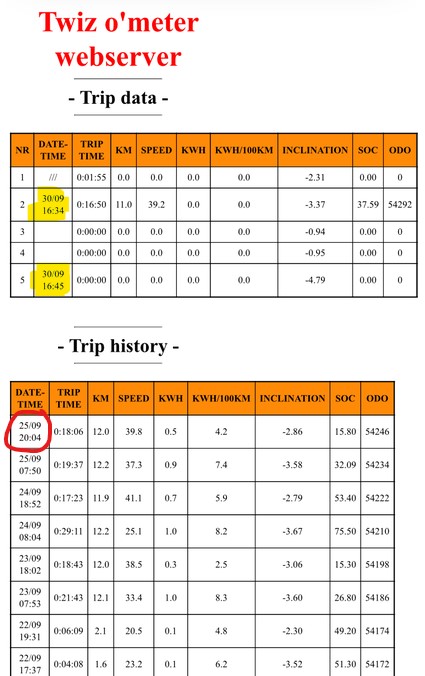
seit Sonntag habe ich ein Andrii-BMS im Twizy. Seitdem wird leider die TripHistory mit den Einzelfahrten nicht mehr aktualisiert.
Trip-Data allerdings schon. Ich habe den Trip-Speicher mal geändert von 5 auf 2 und wieder zurück auf 5, aber die History wird weiterhin nicht aktualisiert.
Hast du eine Idee, was das sein könnte?
Ciao Delvecchio,
I've had an Andrii BMS in my Twizy since Sunday. Unfortunately, since then, the trip history with individual trips is no longer being updated.
However, the trip data is. I changed the trip memory from 5 to 2 and back to 5, but the history is still not being updated.
Do you have any idea what the problem could be?
seit Sonntag habe ich ein Andrii-BMS im Twizy. Seitdem wird leider die TripHistory mit den Einzelfahrten nicht mehr aktualisiert.
Trip-Data allerdings schon. Ich habe den Trip-Speicher mal geändert von 5 auf 2 und wieder zurück auf 5, aber die History wird weiterhin nicht aktualisiert.
Hast du eine Idee, was das sein könnte?
Ciao Delvecchio,
I've had an Andrii BMS in my Twizy since Sunday. Unfortunately, since then, the trip history with individual trips is no longer being updated.
However, the trip data is. I changed the trip memory from 5 to 2 and back to 5, but the history is still not being updated.
Do you have any idea what the problem could be?
Viele Grüße, Andreas
Twizy color 08-2012 | Twizy Sport 04-2015 | Panoramadach | ToM Twiz ‘o meter | Heckfolien | Schmutzfänger | 10kWh Voltraa-Akku | Rozhkov BMS
Tesla Model 3 - long-range, Heckantrieb | PV-Strom | green-planet-energy
Dieses Thema wurde gesperrt.
- Delvecchio
-
- Autor
- Top Boarder
-
- Fabio java
- Beiträge: 934
- Dank erhalten: 1535
30 Sep 2025 21:11 - 30 Sep 2025 21:17 #272807
von Delvecchio
[Twiz O'Meter / BigToM] Update to firmware 2.1
Hi Andreas,
I think the problem is that the kWh value isn't valorized.
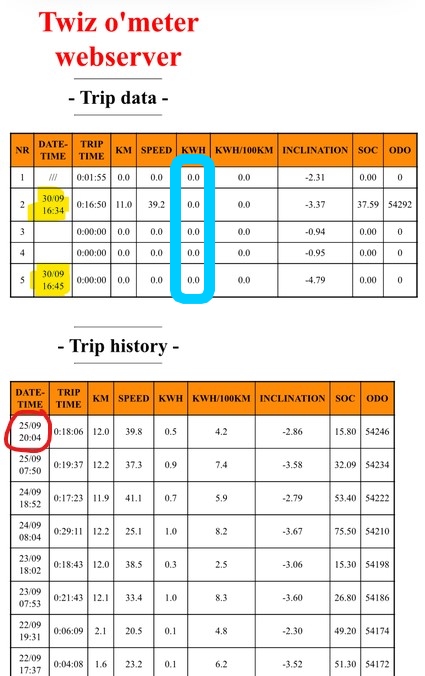
Can you verify if the kWh item in the ToM battery page or where you display it, has a value that changes during driving?
I think the problem is that the kWh value isn't valorized.
Can you verify if the kWh item in the ToM battery page or where you display it, has a value that changes during driving?
Letzte Änderung: 30 Sep 2025 21:17 von Delvecchio.
Folgende Benutzer bedankten sich: Akku61
Dieses Thema wurde gesperrt.
- Snorre
-
- Platinum Boarder
-
- Beiträge: 6446
- Dank erhalten: 4715
30 Sep 2025 23:21 #272815
von Snorre
Das hatte ich vor längerer Zeit auch schon mal.
Du musst ein wenig spielen.
Was letztlich bei mir geholfen hat erinnere ich im Detail nicht mehr.
Während der Fahrt durch die 5 Trip Zähler zappen, eventuell auch mal in die Einstellungen wechseln und wieder zurück zum Hauptdisplay.
Irgend wann sollte der Zähler dann wieder "anspringen".
Im Fahrbetrieb erkennst du bereits nach 100m, wenn der Zähler wieder startet.
Allerdings musst du die gefahrene Strecke im Hauptdisplay anzeigen lassen, damit du die Dezimalstelle angezeigt bekommst.
Lass deinem kindlichen Spieltrieb freien Lauf.
Dann wird das schon wieder.
@Fabio:
I`m quite sure that Andreas will be able to solve the problem by playing around with the different screens.
Twizy Cargo, EZ 07/2014, 110.000 km, Stand 09/2024
[Twiz O'Meter / BigToM] Update to firmware 2.1
Akku61 schrieb: Hast du eine Idee, was das sein könnte?
Das hatte ich vor längerer Zeit auch schon mal.
Du musst ein wenig spielen.
Was letztlich bei mir geholfen hat erinnere ich im Detail nicht mehr.
Während der Fahrt durch die 5 Trip Zähler zappen, eventuell auch mal in die Einstellungen wechseln und wieder zurück zum Hauptdisplay.
Irgend wann sollte der Zähler dann wieder "anspringen".
Im Fahrbetrieb erkennst du bereits nach 100m, wenn der Zähler wieder startet.
Allerdings musst du die gefahrene Strecke im Hauptdisplay anzeigen lassen, damit du die Dezimalstelle angezeigt bekommst.
Lass deinem kindlichen Spieltrieb freien Lauf.
Dann wird das schon wieder.
@Fabio:
I`m quite sure that Andreas will be able to solve the problem by playing around with the different screens.
Twizy Cargo, EZ 07/2014, 110.000 km, Stand 09/2024
Folgende Benutzer bedankten sich: Akku61
Dieses Thema wurde gesperrt.
- Snorre
-
- Platinum Boarder
-
- Beiträge: 6446
- Dank erhalten: 4715
01 Okt 2025 11:26 #272831
von Snorre
Twizy Cargo, EZ 07/2014, 110.000 km, Stand 09/2024
[Twiz O'Meter / BigToM] Update to firmware 2.1
@Andreas:
Im Austausch mit Fabio hat sich ergeben, dass Einträge in die Trip History nur dann erfolgen, wenn sowohl die Fahrstrecke als auch der Energieverbrauch ungleich Null sind.
Nun scheint es so zu sein, dass das Rozhkov BMS den Energieverbrauch gar nicht oder mit einer falschen CAN ID verschickt.
Schau mal nach, ob im ToM ein Wert ungleich Null während der Fahrt angezeigt wird.
Im Austausch mit Fabio hat sich ergeben, dass Einträge in die Trip History nur dann erfolgen, wenn sowohl die Fahrstrecke als auch der Energieverbrauch ungleich Null sind.
Nun scheint es so zu sein, dass das Rozhkov BMS den Energieverbrauch gar nicht oder mit einer falschen CAN ID verschickt.
Schau mal nach, ob im ToM ein Wert ungleich Null während der Fahrt angezeigt wird.
Twizy Cargo, EZ 07/2014, 110.000 km, Stand 09/2024
Folgende Benutzer bedankten sich: Akku61
Dieses Thema wurde gesperrt.
- Akku61
-
- Moderator
-
- Moderator sein heißt andere verstehen lernen.
- Beiträge: 4008
- Dank erhalten: 3413
01 Okt 2025 20:17 #272845
von Akku61
Viele Grüße, Andreas
Twizy color 08-2012 | Twizy Sport 04-2015 | Panoramadach | ToM Twiz ‘o meter | Heckfolien | Schmutzfänger | 10kWh Voltraa-Akku | Rozhkov BMS
Tesla Model 3 - long-range, Heckantrieb | PV-Strom | green-planet-energy
[Twiz O'Meter / BigToM] Update to firmware 2.1
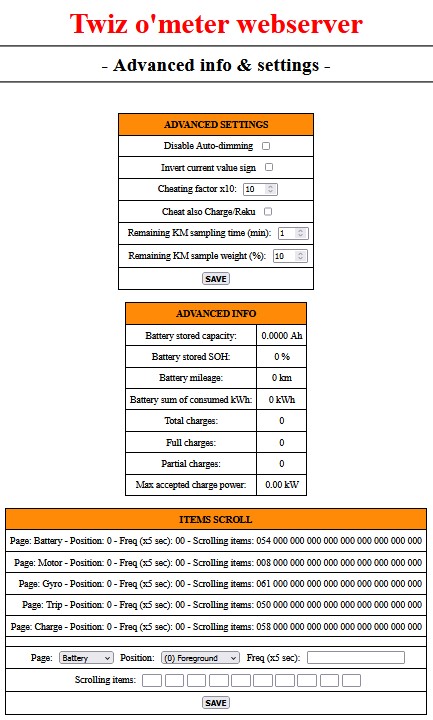
Ich habe mal einen Screenshot von ToM-Webserver vom Bereich "Advanced info & settings" im Stand gemacht.
Auffällig finde ich den Bereich "ADVANCED INFO", da ist alles Null.
I took a screenshot of the ToM web server from the ‘Advanced info & settings’ section.
I find the ‘ADVANCED INFO’ section striking, as everything is set to zero.
Ich setze mich jetzt mal in den Twizy und fahre eine Runde.
-- to be continued --
Auffällig finde ich den Bereich "ADVANCED INFO", da ist alles Null.
I took a screenshot of the ToM web server from the ‘Advanced info & settings’ section.
I find the ‘ADVANCED INFO’ section striking, as everything is set to zero.
Ich setze mich jetzt mal in den Twizy und fahre eine Runde.
-- to be continued --
Viele Grüße, Andreas
Twizy color 08-2012 | Twizy Sport 04-2015 | Panoramadach | ToM Twiz ‘o meter | Heckfolien | Schmutzfänger | 10kWh Voltraa-Akku | Rozhkov BMS
Tesla Model 3 - long-range, Heckantrieb | PV-Strom | green-planet-energy
Dieses Thema wurde gesperrt.
- Akku61
-
- Moderator
-
- Moderator sein heißt andere verstehen lernen.
- Beiträge: 4008
- Dank erhalten: 3413
01 Okt 2025 21:25 #272847
von Akku61
Viele Grüße, Andreas
Twizy color 08-2012 | Twizy Sport 04-2015 | Panoramadach | ToM Twiz ‘o meter | Heckfolien | Schmutzfänger | 10kWh Voltraa-Akku | Rozhkov BMS
Tesla Model 3 - long-range, Heckantrieb | PV-Strom | green-planet-energy
[Twiz O'Meter / BigToM] Update to firmware 2.1
ok, scheint wohl ein größeres Problem zu sein. 
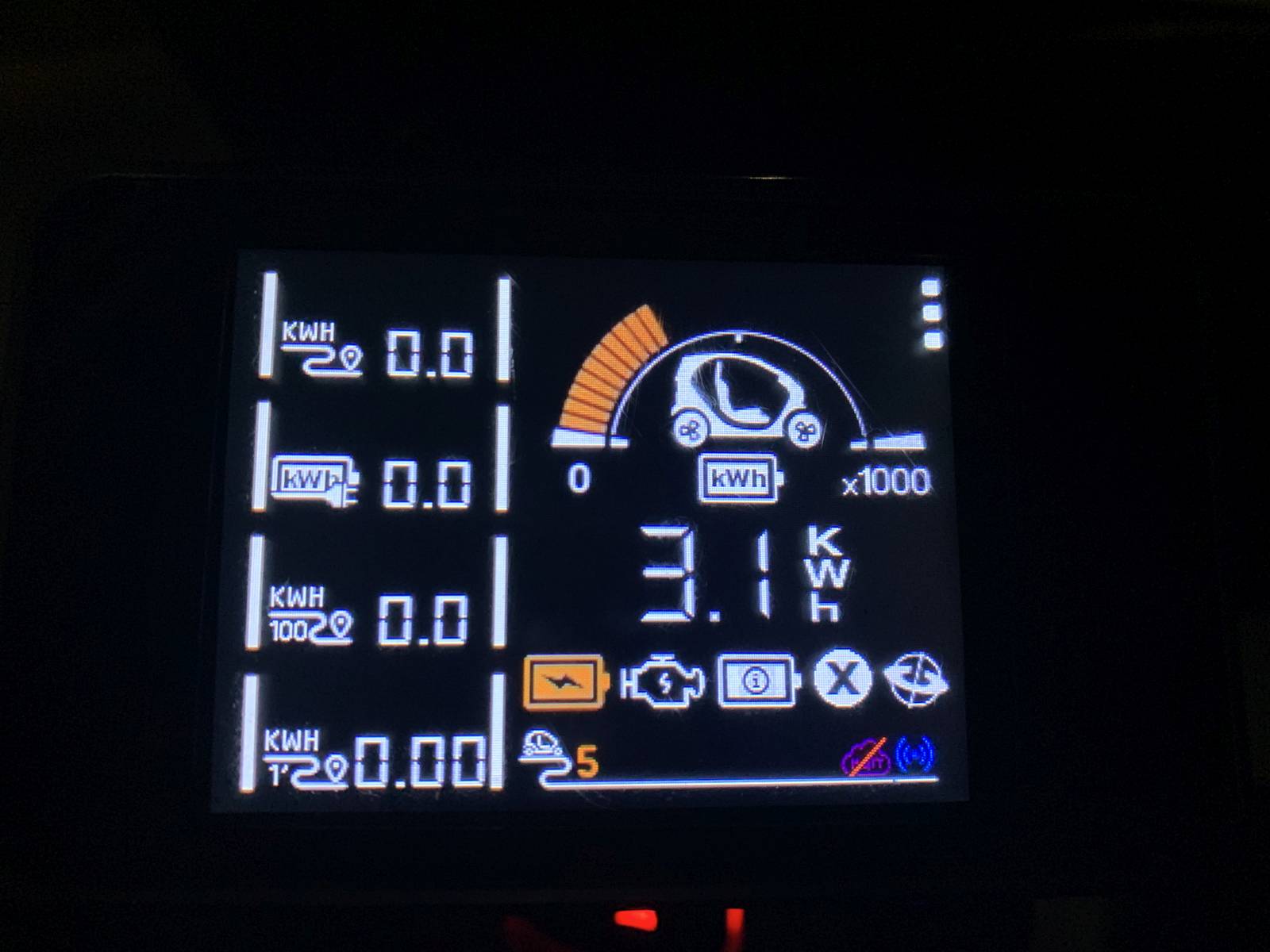
Ich habe mal verschiedene kWh Elemente ins Display geholt. Alle bleiben während der Fahrt auf Null, [kWh] bleibt auf 3,1 stehen.
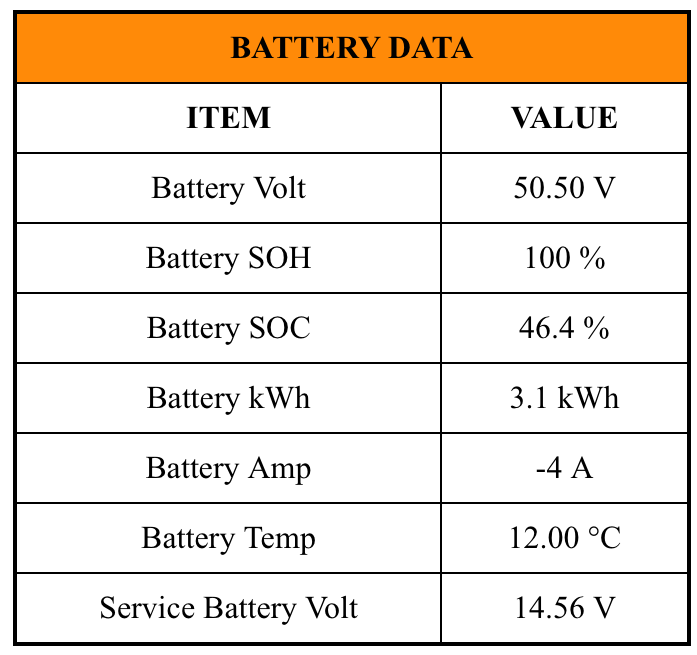
Die 3,1 kWh stehen auch bei den Battery-Data
Während der Fahrt hatte ich einmal kurz [STOP] und [SERV] aufleuchten, war aber direkt wieder weg und danach den Fehlerspeicher voll .
.
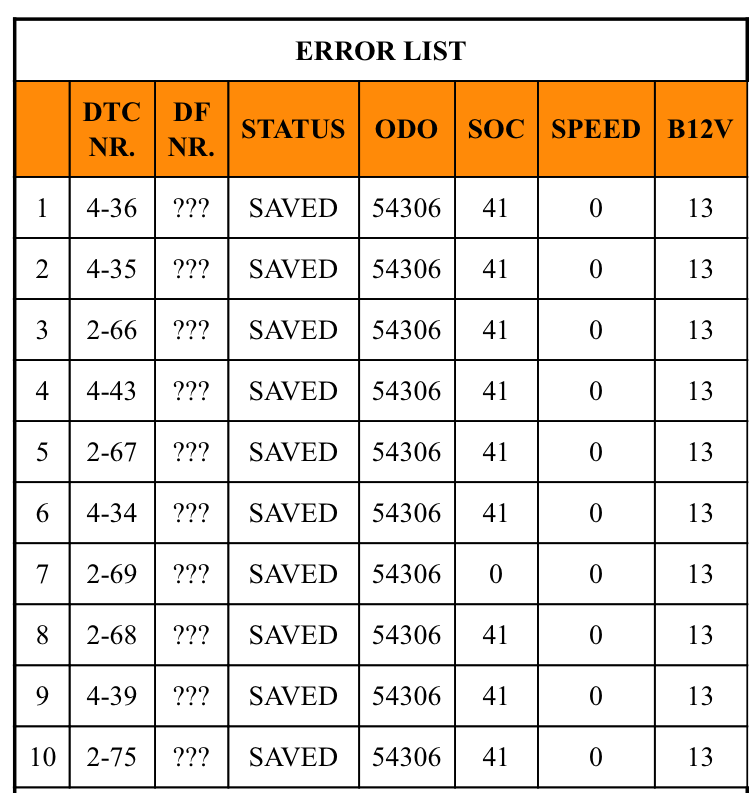
Ich habe mal verschiedene kWh Elemente ins Display geholt. Alle bleiben während der Fahrt auf Null, [kWh] bleibt auf 3,1 stehen.
Die 3,1 kWh stehen auch bei den Battery-Data
Während der Fahrt hatte ich einmal kurz [STOP] und [SERV] aufleuchten, war aber direkt wieder weg und danach den Fehlerspeicher voll
.| DTC Nr. | DFCode | Fehler |
| 2.66 | 192 | LBC MULTIPLEXGETRIEBE NICHT VORHANDEN |
| 2.67 | 193 | LBC MULTIPLEXGETRIEBE NICHT VORHANDEN |
| 2.68 | 313 | LBC MULTIPLEXGETRIEBE NICHT VORHANDEN |
| 2.69 | 314 | LBC MULTIPLEXGETRIEBE NICHT VORHANDEN |
| 2.75 | 318 | LBC MULTIPLEXGETRIEBE NICHT VORHANDEN |
| 4.34 | 330 | LBC MULTIPLEXGETRIEBE NICHT VORHANDEN |
| 4.35 | 331 | LBC MULTIPLEXGETRIEBE NICHT VORHANDEN |
| 4.36 | 332 | LBC MULTIPLEXGETRIEBE NICHT VORHANDEN |
| 4.39 | 430 | LBC MULTIPLEXGETRIEBE NICHT VORHANDEN |
| 4.43 | 150 | ??? |
Viele Grüße, Andreas
Twizy color 08-2012 | Twizy Sport 04-2015 | Panoramadach | ToM Twiz ‘o meter | Heckfolien | Schmutzfänger | 10kWh Voltraa-Akku | Rozhkov BMS
Tesla Model 3 - long-range, Heckantrieb | PV-Strom | green-planet-energy
Dieses Thema wurde gesperrt.
- Delvecchio
-
- Autor
- Top Boarder
-
- Fabio java
- Beiträge: 934
- Dank erhalten: 1535
01 Okt 2025 21:44 #272849
von Delvecchio
[Twiz O'Meter / BigToM] Update to firmware 2.1
Did the problem started after you changed the BMS?
All was fine before?
All was fine before?
Dieses Thema wurde gesperrt.
- Akku61
-
- Moderator
-
- Moderator sein heißt andere verstehen lernen.
- Beiträge: 4008
- Dank erhalten: 3413
01 Okt 2025 21:55 #272851
von Akku61
Viele Grüße, Andreas
Twizy color 08-2012 | Twizy Sport 04-2015 | Panoramadach | ToM Twiz ‘o meter | Heckfolien | Schmutzfänger | 10kWh Voltraa-Akku | Rozhkov BMS
Tesla Model 3 - long-range, Heckantrieb | PV-Strom | green-planet-energy
[Twiz O'Meter / BigToM] Update to firmware 2.1
Yes, I changed the BMS on saturday 28th September and after this the trip history did not get new data.
Viele Grüße, Andreas
Twizy color 08-2012 | Twizy Sport 04-2015 | Panoramadach | ToM Twiz ‘o meter | Heckfolien | Schmutzfänger | 10kWh Voltraa-Akku | Rozhkov BMS
Tesla Model 3 - long-range, Heckantrieb | PV-Strom | green-planet-energy
Dieses Thema wurde gesperrt.
- Akku61
-
- Moderator
-
- Moderator sein heißt andere verstehen lernen.
- Beiträge: 4008
- Dank erhalten: 3413
16 Nov 2025 20:41 #274575
von Akku61
Viele Grüße, Andreas
Twizy color 08-2012 | Twizy Sport 04-2015 | Panoramadach | ToM Twiz ‘o meter | Heckfolien | Schmutzfänger | 10kWh Voltraa-Akku | Rozhkov BMS
Tesla Model 3 - long-range, Heckantrieb | PV-Strom | green-planet-energy
[Twiz O'Meter / BigToM] Update to firmware 2.1
Ciao Fabio,
ich habe eine Frage zu ein paar Symbolen im ToM. Es gibt drei Symbole für "Restreichweite"
I have a question to some Icons in the ToM. There are three Icons for "kilometers left".
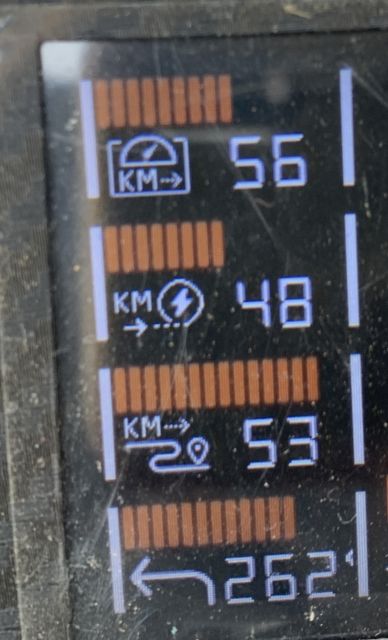
Das Erste zeigt die gleichen Daten, wie das Twizy-Display, richtig?
Aber wie werden die anderen berechnet?
Das Symbol mit dem Pfeil zeigt die Gradzahlen eines Kompass?
The first ist the same data as shown in the Twizy-Display - right?
But how are the others calculated?
The Icon with the arrow shows the degree of a compass?
Thank you in advance
ich habe eine Frage zu ein paar Symbolen im ToM. Es gibt drei Symbole für "Restreichweite"
I have a question to some Icons in the ToM. There are three Icons for "kilometers left".
Das Erste zeigt die gleichen Daten, wie das Twizy-Display, richtig?
Aber wie werden die anderen berechnet?
Das Symbol mit dem Pfeil zeigt die Gradzahlen eines Kompass?
The first ist the same data as shown in the Twizy-Display - right?
But how are the others calculated?
The Icon with the arrow shows the degree of a compass?
Thank you in advance
Viele Grüße, Andreas
Twizy color 08-2012 | Twizy Sport 04-2015 | Panoramadach | ToM Twiz ‘o meter | Heckfolien | Schmutzfänger | 10kWh Voltraa-Akku | Rozhkov BMS
Tesla Model 3 - long-range, Heckantrieb | PV-Strom | green-planet-energy
Dieses Thema wurde gesperrt.
- Delvecchio
-
- Autor
- Top Boarder
-
- Fabio java
- Beiträge: 934
- Dank erhalten: 1535
16 Nov 2025 21:03 - 16 Nov 2025 21:08 #274576
von Delvecchio
[Twiz O'Meter / BigToM] Update to firmware 2.1
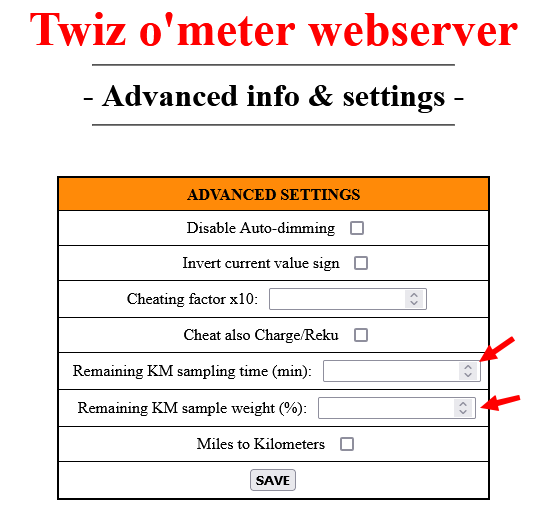
The second icon is the alternative way to calculate the remaining Km.
You can set the parameters of this calculation in the advanced sets of the webUI.
The third is for the remainin Km, calculated with the media data of the current trip.
The fourth it's AngleZ, and it's related to the gyroscope and should measures the rotation around the z-axis.
Something similar to a compass, but if you drive a circle way many times it will grow continuosly.
So, it's not still clear to me what it exactly means.
You can set the parameters of this calculation in the advanced sets of the webUI.
The third is for the remainin Km, calculated with the media data of the current trip.
The fourth it's AngleZ, and it's related to the gyroscope and should measures the rotation around the z-axis.
Something similar to a compass, but if you drive a circle way many times it will grow continuosly.
So, it's not still clear to me what it exactly means.
Letzte Änderung: 16 Nov 2025 21:08 von Delvecchio.
Folgende Benutzer bedankten sich: Akku61, Drakoon1964, Ulli-et-Tom, Sherlock
Dieses Thema wurde gesperrt.